公告管理(Bulletin Management)¶
功能群:協作(collab)|本群無獨立 _overview,共用概念見各頁;SPEC 索引見 README
事實基準:2026-07-05 從 FE / BE code 掃出(
jedi-bulletin套件為底、主專案 extend org_unit 關聯與 created/updated user 顯示名);API schema 逐條對照 marshmallow serializer 與 service 組裝碼
變更紀錄
| 日期 | FR | 內容 |
|---|---|---|
| 2026-10-04 | FR-126(1.24.1) | 編輯器貼上與載入的 HTML 不保留行內 style(只把對齊轉成 class);表單內容欄實際為 TipTap 編輯器 |
| 2026-09-28 | 1.21.0(FR-114) | 公告表單多一個必選的「發送範圍」(全公司/指定部門):選「全公司」不用挑部門、切回全公司會清掉已選部門;選「指定部門」時部門才必填;既有公告一律是「全公司」,清單「公告部門」欄顯示「全公司」。只有作者本人能改、刪:非作者編輯回 404 BULLETIN_404002、刪除回 data=false。挑到不屬目前租戶的部門回 400 BULLETIN_400002。編輯沒帶 org_units 時部門整組維持原值(§1.1 #11、§3、§6.4、§9.3、§12 坑 7/9) |
| 2026-07-17 | site-regression 實測回饋 | §3/§12 坑4 更新:新增/編輯/刪除已掛 @require_capability("bulletin.{create,update,delete}")(e8b28a4a,FR-048 軸④),無能力點回 403 GRC_403022;§12 坑8 更新:時間窗驗證已補 _assert_bulletin_time_window(5cc31915),expire_time<=release_time 回 400 BULLETIN_400001 |
1. 功能描述¶
公告管理頁是系統管理者維護「公告」的後台清單 + 表單頁面:可新增、編輯、刪除公告,並指定發布類別、目標部門、生效區間與啟用狀態。是 公告(檢視) 的管理端鏡像——本頁看到「全部/自己建立的」公告,檢視端只看到 auth=true(已發布且未過期)的公告。
主要使用者:具公告管理選單可見性的系統管理者/權限管理者(BE 未做角色白名單,見 §3)。
角色速覽(本頁無正式角色定義,見 §3 權限說明):
| 角色 | 一句話 |
|---|---|
| 系統管理者 | 公告管理選單可見的操作者——實際上任何登入者打 API 都能操作,FE 僅用選單可見性把關 |
| 一般使用者 | 走 公告(檢視) 端只讀已發布公告,不會進到本頁 |
1.1 功能總覽(本頁全部功能)¶
| # | 功能 | 說明 | 位置 | 詳述 |
|---|---|---|---|---|
| 1 | 公告清單(分頁 / 排序 / 搜尋) | DataTable lazy 分頁;title/release_time/expire_time/enable/created_user_name/updated_at 等欄可排序;關鍵字搜尋比對 title/category/created_user_name/updated_user_name/created_user/updated_user |
BulletinManage.vue 主表格 | UC-BM-01 |
| 2 | 重置查詢 | 清空搜尋字串、排序、回到第一頁(queryStore.resetCurrent()) |
Header「重置查詢」按鈕 | §7 |
| 3 | 新增公告 | 導向空白表單頁 | Header「新增公告」按鈕 | UC-BM-02 |
| 4 | 編輯公告 | 導向表單頁並帶入既有資料 | 表格列「編輯」icon | UC-BM-02 |
| 5 | 刪除公告 | 二次確認 dialog 後呼叫 DELETE,成功後重新查詢 | 表格列「刪除」icon | UC-BM-03 |
| 6 | 瀏覽公告(管理端內) | 導向公告檢視頁(bulletin-view),from 帶回本頁 route name 供麵包屑動態指回 |
表格列「瀏覽」icon | §7 |
| 7 | 類別欄位顯示 | category code 轉譯:system_menu 選單值找不到時 fallback 顯示「其他」 |
表格「類別」欄 | §6.1 |
| 8 | 目標部門欄位顯示 | send_scope='ALL' 顯示單一「全公司」chip;指定部門時顯示部門 chip 清單,超過 5 個收合成「+N…」並 tooltip 展開全部 |
表格「公告部門」欄 | §9.1 |
| 9 | 表單:標題 / 內容 | 標題純文字(必填);內容為 TipTap 富文字(必填,與專案摘要報表共用 TipTapEditor.vue),存成 HTML 字串。貼上的 HTML 不保留行內 style(僅對齊轉 class),載入既有內容同樣處理 |
BulletinForm.vue | UC-BM-02 |
| 10 | 表單:類別下拉 | 選項來自 GET /system-menu/BULLETIN_CATEGORY(必填) |
BulletinForm.vue | §6.1 |
| 11 | 表單:發送範圍+目標部門 | 「發送範圍」SelectButton 必選(全公司 ALL/指定部門 ORG_UNIT,新增預設全公司);選「指定部門」才出現部門 MultiSelect(選項來自部門 menu store,此時至少一個);切回「全公司」時清空已選部門 |
BulletinForm.vue | §6.4 |
| 12 | 表單:起訖時間 | 兩個 Calendar(年-月-日),送出時正規化成 YYYY-MM-DD 00:00:00(皆必填) |
BulletinForm.vue | UC-BM-02 |
| 13 | 表單:是否發布(enable) | InputSwitch,true↔1 / false↔0,非必填(未勾選送 0) |
BulletinForm.vue | UC-BM-02 |
| 14 | 表單驗證 | vuelidate required 規則:title / category / send_scope / release_time / expire_time / content;org_units 只在 send_scope='ORG_UNIT' 時必填(requiredIf);失敗時自動 focus 第一個錯誤欄位 |
BulletinForm.vue | §12 坑 1 |
| 15 | 取消編輯 | 二次確認 dialog 後 router.back(),不送出任何寫入 |
BulletinForm.vue 取消按鈕 | §7 |
| 16 | 全頁遮罩 loading | 載入既有資料 / 送出儲存時顯示全螢幕半透明遮罩 + spinner | BulletinForm.vue | §5 |
UC(§2)只展開 1(清單載入/篩選)/ 2(新增與編輯共用表單流程)/ 3(刪除)三條核心操作路徑;其餘欄位顯示邏輯已在總覽表描述完整。
2. Use Case¶
角色速覽(本頁無正式角色定義,見 §3 權限說明):
| 角色 | 一句話 |
|---|---|
| 系統管理者 | 公告管理選單可見的操作者——實際上任何登入者打 API 都能操作,FE 僅用選單可見性把關 |
| 一般使用者 | 走 公告(檢視) 端只讀已發布公告,不會進到本頁 |
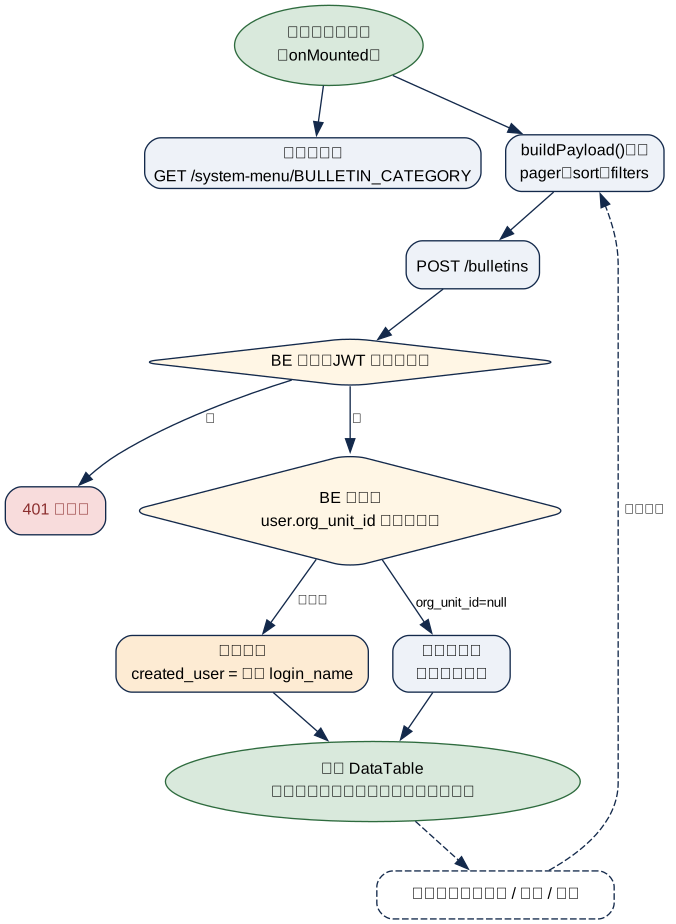
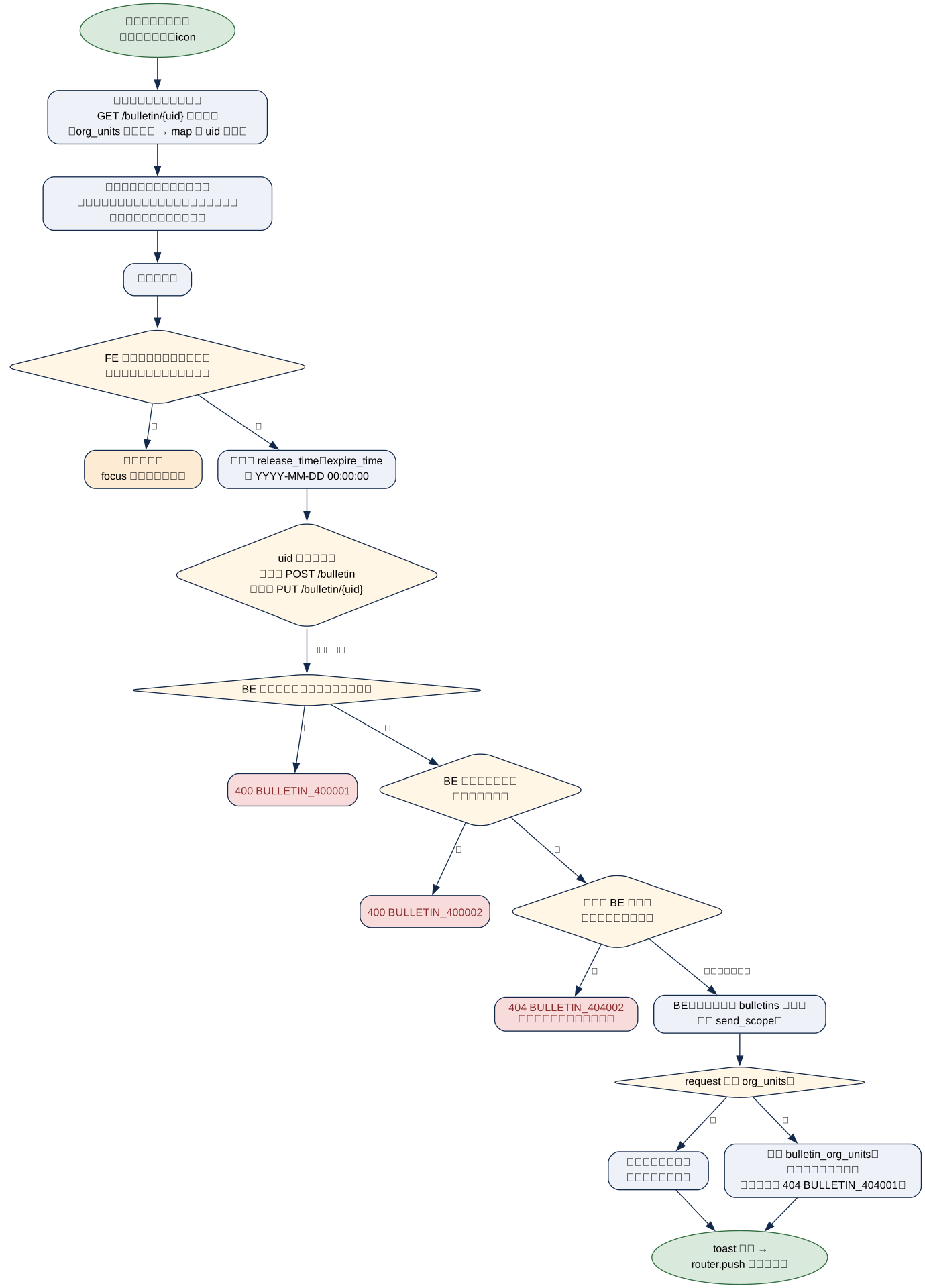
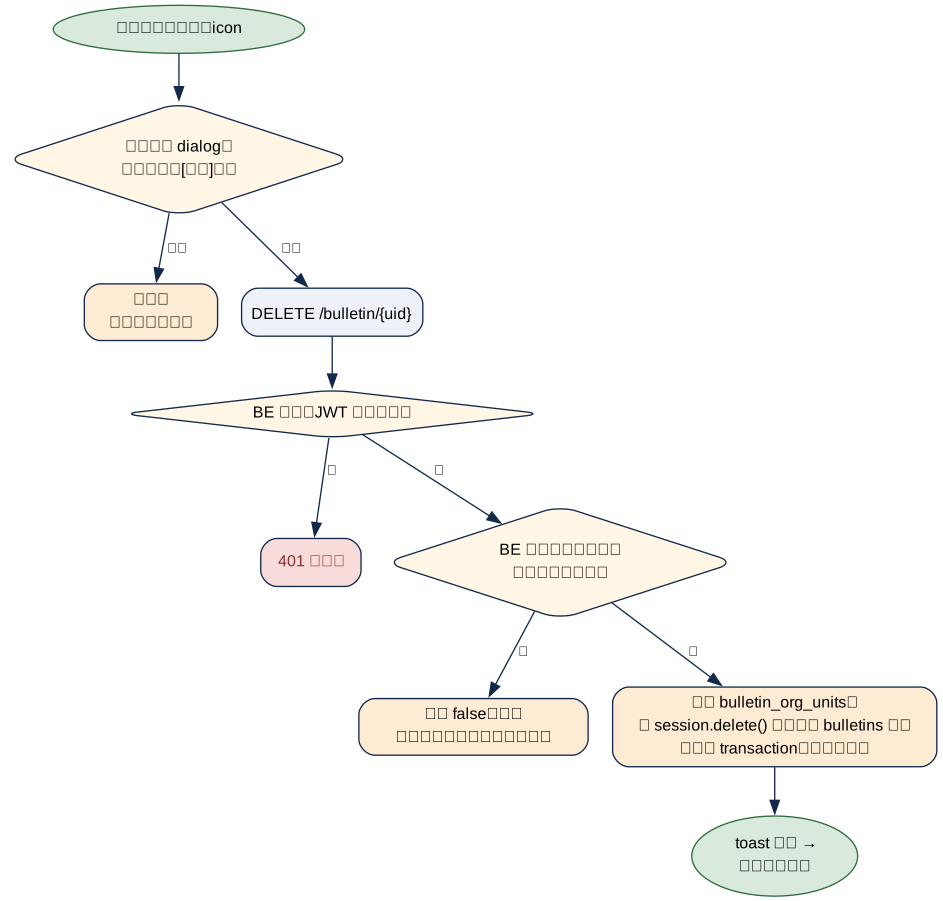
流程圖視覺慣例:菱形 = 判斷、橘底 = 例外/擋下、紅框 = 錯誤(標 error code)、綠框 = 成功終點、虛線 = 可選路徑。
UC-BM-01 公告清單載入與篩選¶
| 項目 | 內容 |
|---|---|
| 角色 | 任一已登入使用者(BE 無角色守門,見 §3) |
| 前置條件 | 已登入(JWT 有效) |
| 產出 / 後置條件 | 無寫入;回傳分頁公告清單,org_unit_id 有值時只回自己建立的公告(§12 坑 2) |
UC-BM-02 新增/編輯公告¶
| 項目 | 內容 |
|---|---|
| 角色 | 任一已登入使用者(同上) |
| 前置條件 | 表單必填欄位(title/category/send_scope/release_time/expire_time/content;指定部門時加 org_units)皆有值;編輯時操作者須為該公告作者 |
| 產出 / 後置條件 | bulletins 一列新增或更新(含 send_scope);有帶 org_units 時 bulletin_org_units 先刪後建,沒帶則維持原值(見 §6.4) |
UC-BM-03 刪除公告¶
| 項目 | 內容 |
|---|---|
| 角色 | 任一已登入使用者(同上) |
| 前置條件 | 二次確認 dialog 按下「確定」;操作者須為該公告作者(非作者 BE 回 data=false、不刪) |
| 產出 / 後置條件 | bulletins 該列實際被刪除(非軟刪除,見 §12 坑 3);bulletin_org_units 由 service 先清再刪主表(FK 無 CASCADE,順序反了會撞外鍵) |
3. 權限矩陣¶
| 操作 | FE 判定 | BE 強制 | BE 檢查位置 |
|---|---|---|---|
| 選單 / 頁面可見性 | 選單可見性(ui_routes 標準機制,非公告專屬 capability) |
無——路由僅 @jwt_required() |
api/bulletin/routes/bulletin_route.py:25,43,53,65,76 |
| 清單查詢範圍 | 無額外判定,BE 回什麼顯示什麼 | 依 user.org_unit_id 決定:有部門 → 只回 created_user = 自己;org_unit_id 為 null → 不限制,回全部 |
app/bulletin/service/bulletin_service.py:38-45 |
| 新增 | 表格列按鈕恆顯示(canEdit() 在管理頁恆 true,只有 view 模式才隱藏) |
@require_capability("bulletin.create"),無此能力點回 403 GRC_403022 |
api/bulletin/routes/bulletin_route.py:55 |
| 編輯 | 同上 | @require_capability("bulletin.update"),無此能力點回 403 GRC_403022;另比對作者(created_user=登入帳號),非作者回 404 BULLETIN_404002(不回 403,避免洩漏公告存在) |
api/bulletin/routes/bulletin_route.py:68;作者檢查 jedi_bulletin/app/service/bulletin_service.py::_assert_author |
| 刪除 | 同上 | @require_capability("bulletin.delete"),無此能力點回 403 GRC_403022;非作者與查無此公告一律回 data=false(不可分辨) |
api/bulletin/routes/bulletin_route.py:80;jedi_bulletin/app/service/bulletin_service.py::delete_bulletin |
| 選部門 | 部門選單 | 寫入前逐一檢查所選部門屬於目前作用租戶,不屬回 400 BULLETIN_400002(母公司管理員看得到子公司部門,但不能發給它) |
jedi_bulletin/app/service/bulletin_service.py::_assert_org_units_in_active_tenant → core/plugins/bulletin.py::BulletinOrgUnitDirectory.is_in_active_tenant |
能力點只管「能不能改公告」,管不到「能不能改別人的公告」——所以編輯與刪除另外比對作者本人。公告沒有建立者(
created_user為 NULL 的歷史資料)時一律視為非作者。FR-048 軸④ 更新(2026-07-07,commit
e8b28a4a):公告新增/編輯/刪除三個寫入操作已從「僅@jwt_required()」升級為@require_capability("bulletin.{create,update,delete}"),無對應能力點回 403GRC_403022(GRC_CAPABILITY_REQUIRED)。§12 坑 4(舊「BE 完全無角色守門」描述)已撤銷。
4. 狀態機與前置條件¶
本頁公告本身沒有狀態機(只有 enable 布林開關 + 時間區間),與稽核輪次等狀態機無關。相關 gate:
| 條件 | 效果 | 出處 |
|---|---|---|
enable = 1 且 release_time <= now 且 expire_time >= now |
公告在 檢視端(auth=true 查詢)才會顯示——管理端本頁不受此限,恆顯示全部(依 §3 範圍規則) |
domain/bulletin/service/bulletin_domain_service.py:16-19、infra _gen_filters |
| 表單必填欄位未填(含發送範圍;指定部門時含部門) | 送出被 vuelidate 擋下,不會打 API | BulletinForm.vue(rules,org_units 用 requiredIf) |
user.org_unit_id 有值 |
清單查詢自動加 created_user = 自己(見 §3) |
bulletin_service.py:43-44 |
5. UI 設計¶
📸 實際畫面截圖待補(一律亮色模式拍攝):以 playwright 對 STG 擷取,預計補以下三張到
assets/img/: ① 公告管理清單整頁(表格 + 篩選列 + 類別/部門欄)bulletin-mgmt-list.png② 新增/編輯表單整頁(標題、類別、部門、起訖時間、發布開關、富文字內容)bulletin-mgmt-form.png③ 刪除二次確認 dialog 特寫bulletin-mgmt-delete-confirm.png
版面骨架(清單頁:Header + DataTable;表單頁:單欄表單卡片;刪除為二次確認 dialog):
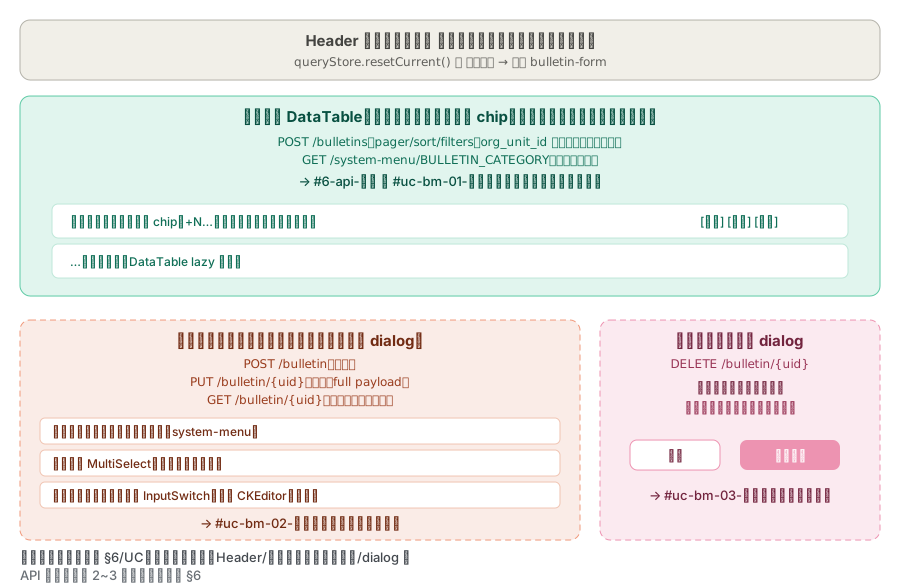
狀態呈現:清單載入中 DataTable 內建 loading 遮罩(submit state);表單頁載入既有資料 / 送出儲存時顯示全螢幕半透明遮罩 + ProgressSpinner(非局部);無 socket,儲存後靠 router.push 導回清單頁觸發重新載入(非本地增量更新)。
6. API 規格¶
Envelope:成功 {"status": true, "data": …}、失敗 {"status": false, "error_code": "…", "msg": "…"}(common/util/response_util.py:return_response)。
6.1 總清單(本頁呼叫的全部 endpoint)¶
| 分類 | Method + Path | 說明 | 完整規格 |
|---|---|---|---|
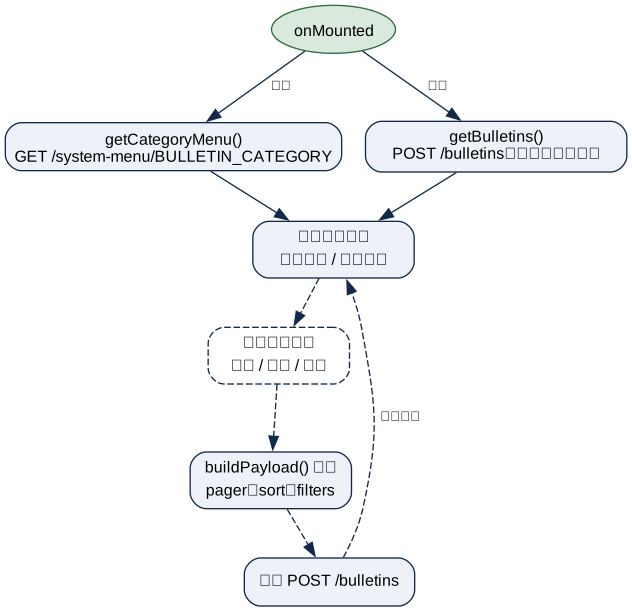
| 載入 | POST /bulletins |
分頁公告清單(本頁唯一列表 API) | §6.2 |
| 載入 | GET /bulletin/{uid} |
單筆公告詳情(編輯表單帶入資料) | §6.3 |
| 寫入 | POST /bulletin |
新增公告 | §6.4 |
| 寫入 | PUT /bulletin/{uid} |
更新公告(full payload,非 partial patch) | §6.4 |
| 寫入 | DELETE /bulletin/{uid} |
刪除公告(實際為硬刪除,見 §12 坑 3) | §6.4 |
| 選單 | GET /system-menu/BULLETIN_CATEGORY |
公告類別下拉選項(通用 system-menu 機制,非公告專屬 API) | — |
| 選單 | 部門 menu store(menuStore.fetchOrgUnitMenu()) |
表單目標部門 MultiSelect 選項 | — |
DELETE /bulletin(無{uid},body 帶 uid)與PUT /bulletin(同)路由亦存在於routes.json,但本頁 FE 一律走{uid}path variant;無{uid}的變體本頁未使用,故不展開。
6.2 公告清單類¶
[POST] /bulletins¶
Request(繼承 RequestMetaSchema 分頁/排序 + filters 巢狀物件):
| 欄位 | 型別 | 必填 | 說明 |
|---|---|---|---|
| pager | object | 否 | {page, page_size} |
| sort | array | 否 | [{field, order}] |
| filters.title / .category / .created_user_name / .updated_user_name / .created_user / .updated_user | string | 否 | 全域搜尋套用於 allowFilterFields 定義的欄位(BulletinManage.vue:28) |
| filters.auth | bool | 否 | 本頁固定不送(false);檢視頁 固定送 true |
| filters.enable / .is_delete | int | 否 | 狀態過濾(本頁 UI 未提供對應篩選欄位,僅 API 層支援) |
出處:api/bulletin/serializers/bulletin_query.py:5-23(BulletinQueryRequest / BulletinPageQueryRequest)
Response data(陣列,每項):
| 欄位 | 型別 | 說明 |
|---|---|---|
| uid | string | 公告識別碼 |
| title / category / content | string | 標題 / 類別 code / 內容(HTML 字串,fields.Raw) |
| org_units[] | array | {uid, name}(dump_only,唯讀顯示用) |
| release_time / expire_time | date(YYYY-MM-DD) |
生效區間(僅日期,無時分秒) |
| enable | int | 1 啟用 / 0 停用 |
| created_user / created_user_name | string | login_name / nickname(審計欄位規範:nickname 由 ExtendedBulletin.created_user_name hybrid_property 從 User.nickname 查得) |
| updated_user / updated_user_name | string | 同上 |
| created_at / updated_at | datetime(YYYY-MM-DD HH:MM:SS) |
審計時間 |
出處:api/bulletin/serializers/bulletin.py:15-32(BulletinResponse / BulletinPageQueryResponse);分頁彙整 app/bulletin/service/bulletin_service.py:33-55
6.3 公告詳情類¶
[GET] /bulletin/{uid}¶
無 body。Response data:同 §6.2 單筆形狀(BulletinResponse)。出處:api/bulletin/routes/bulletin_route.py:45-48
6.4 公告寫入類¶
[POST] /bulletin¶
Request:
| 欄位 | 型別 | 必填 | 說明 |
|---|---|---|---|
| title | string | 是 | 標題 |
| category | string | 是 | 類別 code(對應 BULLETIN_CATEGORY menu) |
| send_scope | string | 否(FE 必送) | 發送範圍:ALL(全公司)/ORG_UNIT(指定部門),字串凍結(對應 DB CHECK 約束)。沒帶時由 org_units 回推:有部門 → ORG_UNIT、空陣列 → ALL;兩者都沒帶新增時落 ALL、編輯時維持原值 |
| org_units | array[string] | 否(ORG_UNIT 時 FE 必填) |
目標部門 UID 陣列;有帶時後端逐一檢查部門屬目前租戶(否則 400 BULLETIN_400002)、查無部門 404 BULLETIN_404001,再關聯進 bulletin_org_units。ALL 時 FE 送空陣列 |
| content | raw | 是 | 內容 HTML 字串(TipTap 輸出,無格式驗證) |
| release_time / expire_time | date(%Y-%m-%d) |
否(FE 端 vuelidate 視為必填,schema 層未標 required) | 生效區間 |
| enable | int | 否(default 0) | 是否啟用 |
出處:api/bulletin/serializers/bulletin.py:5-12(BulletinRequest);建立邏輯 app/bulletin/service/bulletin_service.py:78-100(add_bulletin:先建 bulletins 列,再逐一查 org_unit_uid 建 bulletin_org_units 關聯,查無部門 → NotFound(BULLETIN_404001))
Response:同 §6.2 單筆形狀(含新建立的 uid)。
[PUT] /bulletin/{uid}¶
Request:同 POST 的 BulletinRequest(FE 送出整包 currData)。操作者須為作者,非作者回 404 BULLETIN_404002。
更新邏輯(app/bulletin/service/bulletin_service.py:102-125,update_bulletin):
- 比對作者(
_assert_author),非作者當作查無此公告 - 更新
bulletins主表欄位(title / content / category / enable / release_time / expire_time / send_scope / updated_user);send_scope沒帶也回推不出來時維持原值 - request 有帶
org_units才動部門:先整批刪除該公告全部bulletin_org_units關聯,再依陣列重建(空陣列=清空,配合send_scope='ALL');沒帶org_units整組維持原值
Response:同 GET 單筆形狀。
[DELETE] /bulletin/{uid}¶
無 body。Response data:布林值(BooleanResponse);非作者或查無此公告回 false、不刪。刪除前先清 bulletin_org_units 再刪主表,兩者同一 transaction。出處:api/bulletin/routes/bulletin_route.py:74-79;刪除邏輯 domain/bulletin/service/bulletin_domain_service.py:47-48 → IBaseRepo.delete_by_uid(session.delete(),見 §12 坑 3)
7. 前端檔案地圖(compliance-manager-fe/)¶
| 檔案 | 角色 |
|---|---|
src/views/bulletins/BulletinManage.vue |
公告管理清單頁(同元件也被 bulletin-list route 以 view=true prop 複用成公告檢視清單,見 公告檢視) |
src/views/bulletins/BulletinForm.vue |
新增/編輯表單頁(同一元件依 route.query.uid 是否存在切換新增/編輯模式) |
src/config/router/index.js:10-23 |
兩條 route:bulletin-manage(path /bulletin/bulletin-manage)/ bulletin-form(path /bulletin/bulletin-form,query uid) |
src/config/api/api.js:83-84 |
BULLETINS(列表)/ BULLETIN(單筆 CRUD)API 常數 |
src/service/BaseService.js |
axios 封裝(post/get/put/delete),本頁唯一呼叫方式 |
src/composables/useTableQuery.js |
分頁/排序/搜尋狀態管理(跨頁共用 composable,依 route scope + user uid 持久化) |
src/stores/queryStore.js |
useTableQuery 底層 pinia store,持久化查詢狀態 |
src/stores/menuStore.js |
fetchOrgUnitMenu() — 表單部門 MultiSelect 選項來源 |
src/views/project-summary-report/TipTapEditor.vue |
表單內容欄位的富文字編輯器(與專案摘要報表共用;貼上/載入時處理行內 style) |
src/service/BulletinService.js |
未使用的殘留檔——讀寫本地 demo JSON(/demo/data/bulletin.json),本頁實際走 BaseService + API.BULLETIN*,非此檔(見 §12 坑 5) |
src/config/locales/i18n/{zh-tw,en}/bulletin.json |
頁面 i18n(namespace lang.bulletin_manage.*) |
src/config/locales/i18n/{zh-tw,en}/menu.json |
選單顯示名稱(bulletin-manage / bulletin-form key) |
8. 後端檔案地圖(本頁核心鏈路)¶
| 鏈路 | Route | App Service | 底層 |
|---|---|---|---|
| 公告清單 | api/bulletin/routes/bulletin_route.py::BulletinsRoute(POST /bulletins) |
app/bulletin/service/bulletin_service.py::get_bulletins_and_pager |
domain/bulletin/service/bulletin_domain_service.py → infra/bulletin/repository/bulletin_repo_impl.py::BulletinRepoImpl(繼承 jedi_bulletin base + 主專案覆寫 _gen_filters/add/update 以支援 org_units 關聯與 tenant 欄位) |
| 公告詳情 / CRUD | 同檔 BulletinRoute(GET/POST/PUT/DELETE /bulletin[/{uid}]) |
同 service 的 get_bulletin / add_bulletin / update_bulletin / delete_bulletin |
同上 + domain/bulletin/service/bulletin_org_unit_domain_service.py → infra/bulletin/repository/bulletin_org_unit_repo_impl.py(bulletin_org_units 關聯表直接 SQL insert/delete,非走 ORM relationship 寫入) |
DDD 提醒:本模組是主專案 extend 外部套件(jedi-bulletin)的標準模式——domain/bulletin/entities/bulletin_entity.py 繼承套件 BaseBulletinEntity 再加 org_units/created_user_name 等主專案欄位;infra/bulletin/models/bulletin.py::ExtendedBulletin 繼承套件 Bulletin model 再加 org_units relationship 與 created_user_name/updated_user_name hybrid_property(審計欄位回傳規範的標準做法:app service 不做、model 層直接算)。新增本模組功能時比照此 extend 模式,不要直接改 jedi-bulletin 套件本身除非確認是套件 domain 該有的行為。
9. DB¶
9.1 資料表總清單(本頁讀寫的全部表)¶
| 表 | 讀/寫 | 說明 | 欄位詳述 |
|---|---|---|---|
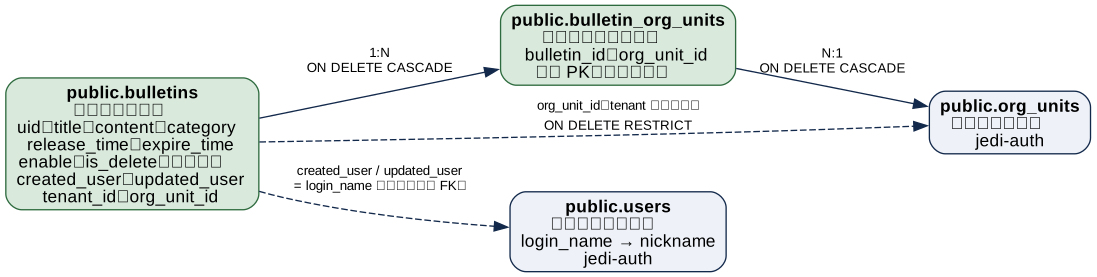
| public.bulletins | 寫 | 公告主表(jedi-bulletin 套件定義 + 主專案 tenant_id/org_unit_id 欄位) |
§9.3 |
| public.bulletin_org_units | 寫 | 公告 ↔ 部門多對多關聯表(純關聯表,無自身 PK) | §9.3 |
| public.org_units | 讀 | 部門主檔(jedi-auth),提供目標部門選項與名稱顯示 |
見 jedi-auth 相關頁 |
| public.users | 讀 | 使用者主檔,created_user_name/updated_user_name 透過 login_name join 取得 nickname |
見使用者管理相關頁 |
9.2 ER 圖(本頁讀寫範圍)¶
9.3 核心表欄位(取自 DEV DB dump,含 DB comment)¶
public.bulletins — 公告主表¶
DB comment:「公告表:儲存系統公告資訊,包含標題、內容、類別及發布時效」。
| 欄位 | 型別 | 說明 |
|---|---|---|
| id | integer | 內部 PK(nextval('bulletins_id_seq')) |
| uid | varchar(50) | 對外識別碼(API 走 uid) |
| title | varchar(255) | 公告標題 |
| content | text | 公告內容(HTML 字串) |
| category | varchar(50) | 公告類別,default 'others' |
| release_time / expire_time | timestamp without time zone | 發布時間 / 過期時間(expire_time 可為 null;release_time DB 層 not null,但 FE schema 未強制必填,見 §12 坑 1) |
| enable | integer | 是否啟用:1 啟用,0 停用,default 1 |
| is_delete | integer | 是否已刪除:1 已刪除,0 未刪除,default 0——欄位存在但 API 刪除路徑並未使用(見 §12 坑 3) |
| created_user / updated_user | varchar(50) | login_name(審計欄位,nickname 由 model hybrid_property 動態查) |
| tenant_id | integer | → tenants.id(ON DELETE RESTRICT) |
| send_scope | varchar(20) | 發送範圍:ALL=全公司、ORG_UNIT=指定部門(配合 bulletin_org_units),default 'ALL',CHECK 限這兩值(chk_bulletins_send_scope);既有公告升級後一律 ALL |
| org_unit_id | integer | → org_units.id(ON DELETE RESTRICT)——注意這是 tenant/建立部門欄位,非 org_units 關聯,實際「目標部門」關聯走 bulletin_org_units 多對多表 |
索引 idx_bulletins_live(tenant_id, org_unit_id, release_time WHERE enable=1 AND is_delete=0)顯示原始套件設計是預期 is_delete 會被使用於「生效中公告」查詢——與 §12 坑 3 現況不一致,屬既有債。
public.bulletin_org_units — 公告目標部門關聯(純關聯表)¶
| 欄位 | 型別 | 說明 |
|---|---|---|
| bulletin_id | integer | → bulletins.id(無 ON DELETE CASCADE——刪公告前必須先清本表,見 §6.4),複合 PK 之一 |
| org_unit_id | integer | 部門 id,軟參照、無外鍵(org_units 屬 jedi-iam),複合 PK 之一 |
無自身序列 / 額外欄位;PK = (bulletin_id, org_unit_id)。
10. 頁面邏輯與資料對應¶
載入時序(清單頁):
關鍵欄位對應(API ↔ 畫面,清單頁):
| 畫面元素 | FE state | API 欄位 |
|---|---|---|
| 類別欄顯示文字 | trensCategoryDesc(data.category)(查 categoryMenu 比對 value,找不到 fallback others) |
category |
| 公告部門 chip | send_scope==='ALL' → 單一「全公司」chip;否則 data.org_units.slice(0, 5) + 「+N…」 |
send_scope、org_units[] |
| 發布欄 | data.enable === 1 ? '是' : '否' |
enable |
| 建立 / 修改人員欄 | 直接綁定 | created_user_name / updated_user_name |
關鍵欄位對應(表單頁):
| 畫面元素 | FE state | API 欄位 |
|---|---|---|
| 發送範圍 SelectButton | currData.send_scope(新增預設 'ALL';切回 ALL 時 watch 清空 org_units) |
request/response send_scope |
目標部門 MultiSelect(僅 ORG_UNIT 顯示) |
currData.org_units(getBulletin() 時把 res.org_units[] 物件陣列 map 成 uid 陣列) |
request/response org_units(GET 回物件陣列,PUT/POST 送 uid 陣列——同名欄位讀寫形狀不同,見 §12 坑 6) |
| 起訖時間 | currData.release_time / .expire_time(Calendar 元件,Date 物件) |
送出前 moment(...).format('YYYY-MM-DD 00:00:00') 正規化字串 |
| 內容 | currData.content(TipTap v-model) |
content(fields.Raw,無格式驗證) |
儲存流程:表單一次性整包送出(無分段儲存);uid 存在則 PUT 走 update(),否則 POST 走 create();儲存成功後 toast 提示並 router.push('/bulletin/bulletin-manage') 導回清單(觸發清單頁 onMounted 重新載入,非共用 store 或事件通知)。
錯誤對應:BE error envelope → 走全域 axios interceptor 的 axios-error event bus → toast 顯示;已知錯誤碼:BULLETIN_404001(新增/更新時目標部門 UID 查無資料)、BULLETIN_404002(編輯非本人公告或公告不存在)、BULLETIN_400001(下架時間不晚於上架時間)、BULLETIN_400002(部門不屬目前租戶)。
11. 背景行為與外部依賴¶
| 類型 | 內容 |
|---|---|
| 通知 | 無——公告的發布本身不觸發站內通知,僅在檢視端依 auth=true 查詢條件顯示 |
| Socket | 無 socket / 輪詢;清單更新靠操作後重新 getBulletins() 或導頁 |
| jedi-* 套件 | jedi-bulletin(BulletinEntity/Bulletin model/BulletinRepoImpl 基底類別,主專案 extend 加 org_units 關聯與審計欄位顯示名)、jedi-auth(OrgUnit/User model、JWT) |
| 系統參數 | 無 feature flag;公告類別選項來自通用 system_menu(BULLETIN_CATEGORY code),非本模組專屬設定表 |
12. 邊界情況與已知坑¶
release_time/expire_timeFE/BE 必填認定不一致:FE vuelidate 兩者皆標required,但 BEBulletinRequestschema 未標required=True(僅fields.DateTime,可省略);DB 層release_timeNOT NULL、expire_time允許 NULL。繞過 FE 直接打 API 省略release_time會在 DB insert 階段才失敗(500,非乾淨的 400),不是本頁 UI 會遇到的路徑,但要注意 API 本身沒有做完整前置驗證- 清單查詢範圍規則寫在 comment 裡、行為容易誤解:
user.org_unit_id有值時只回「自己建立」的公告,org_unit_id為 null 才回全部——這與一般直覺「有部門的人看得到更多」相反,是刻意設計成「無部門掛職者視為系統管理者,可看全部」(bulletin_service.py:42原始碼註解)。改動這條過濾邏輯前務必理解此意圖 - 刪除是硬刪除,
is_delete欄位形同虛設:domain/bulletin/service/bulletin_domain_service.py:47呼叫的是BaseRepositoryImpl.delete_by_uid(session.delete()實體刪除),而非利用is_delete欄位做軟刪除。DB 索引idx_bulletins_live的設計意圖明顯是預期軟刪除(WHERE enable=1 AND is_delete=0),現況等於該索引條件恆為「未刪除」子集但is_delete永遠是 0。刪除公告的 API 呼叫方沒有恢復機制,屬已知債,新 code 不要假設bulletins有軟刪資料可查 - ~~寫入操作 BE 無角色守門~~ 已修復(2026-07-07,
e8b28a4a,FR-048 軸④):新增/編輯/刪除三支 API 已掛@require_capability("bulletin.{create,update,delete}"),無對應能力點回 403GRC_403022,詳見 §3 BulletinService.js是死碼:src/service/BulletinService.js讀寫/demo/data/bulletin.json本地假資料,本頁兩個 view 實際皆透過BaseService+API.BULLETINS/API.BULLETIN呼叫真實後端,此檔案未被任何 view import。清理前端死碼時可考慮移除,但需先確認無其他隱藏引用org_units欄位讀寫形狀不同:GET 回傳org_units: [{uid, name}, …](物件陣列,dump_onlynested schema),但 POST/PUT 送出時需為org_units: ["uid1", "uid2", …](純 uid 字串陣列)。BulletinForm.vue:75的getBulletin()手動做了這個轉換(res.org_units.map(obj => obj.uid))——同名欄位跨讀寫語意不同,日後串接或除錯要留意,不能直接假設兩邊形狀一致org_units省略與空陣列語意不同:省略=部門整組維持原值;空陣列=清空部門。FE 選「全公司」時送空陣列、send_scope='ALL';直接打 API 只改標題時不要帶org_units,否則會把發送對象清掉- ~~無 phase / 時間窗前置檢查~~ 已修復(2026-07-07,
5cc31915):新增/編輯已加_assert_bulletin_time_window()(app/bulletin/service/bulletin_service.py:50-58,add_bulletin/update_bulletin呼叫處各見 121-126、147-153 行)——release_time/expire_time皆有值且expire_time <= release_time時擋下,回 400BULLETIN_400001(BULLETIN_INVALID_TIME_WINDOW)。單邊None或無法解析仍放行不擋。FE 未做對應前端驗證,此為 BE 端單邊防線 - 只有作者能改刪,非作者回的不是 403:編輯回 404
BULLETIN_404002、刪除回data=false——刻意讓「別人的公告」與「不存在的公告」看起來一樣。沒有作者的歷史公告(created_user為 NULL)任何人都改不動,要動走維運路徑 - 發送範圍與部門要一致:
send_scope='ALL'時部門不作用(清單只顯示「全公司」);ORG_UNIT時只有橋表列到的部門看得到。讀者端的過濾規則見 公告檢視 §4
13. 開發與驗證¶
- 跑起來:BE
python main_socketio.py(port 8000,log 在log/app.log);FE 在compliance-manager-fe/起 Vite dev server。BE 改 service code 後必須重啟(無 hot reload) - 測試帳號:dev 環境一般登入帳號即可操作(密碼見
.env/ 部署文件;BE 無角色守門,見 §3) - 導航路徑:登入 → 側邊選單「公告管理」(
bulletin-manage)→ 新增/編輯走「編輯公告」(bulletin-form) - 前置資料:需至少一個部門(
org_units)存在才能通過表單必填驗證;BULLETIN_CATEGORYsystem-menu 需有選項資料才能選類別 - E2E:
compliance-manager-test/repo(Cucumber + Playwright);本頁相關 feature 檔以公告/bulletin搜尋 - 相關文件:
docs/api/bulletin/Bulletin-SA-SD.docx(既有 API 規格文件,可當背景參考,欄位以本頁 §6 為準);歷史修復docs/changelog/2026-06-08-fix-bulletin-time-filter-direction.md(auth=true時間比對方向 bug,已在jedi-bulletin套件層修正,見 §6.2 filter 說明);檢視端見 公告檢視